DualSense Edge Back Buttons: What Should You Map Them To?
The Edge gives you only two rear inputs, which makes choosing them more important. The best assignments are usually actions that would otherwise make your right thumb leave the aiming or camera stick.
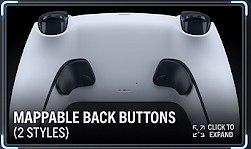
Start with actions that interrupt aim or camera control.
For Warzone, jump and crouch/slide are a strong starting pair. For Elden Ring, dodge/sprint deserves serious consideration. Gran Turismo 7 gets less benefit from rear inputs, so use them for personal secondary functions rather than forcing a competitive layout onto a driving game.
Map Actions That Normally Pull Your Thumb Off the Right Stick
The best use of the Edge back buttons is not “put your two favorite buttons there.” Start with actions that force you to move your right thumb away from camera control or aiming. That is where a rear input can change how the controller feels.
Because the Edge gives you two rear inputs rather than four, each one should earn its place. If an action is already easy to hit without compromising movement or aim, it may not deserve one of those two slots.
Start With Jump and Crouch/Slide
For a shooter, the obvious first experiment is moving jump and crouch/slide to the rear buttons. Both are actions that can otherwise make your right thumb leave the aiming stick at exactly the wrong moment.
Another useful option is to move an L3 or R3 click to the rear if you dislike pressing the sticks during movement. The right answer depends on your current layout, but the principle stays the same: protect your aiming thumb.
Dodge/Sprint Is the First Button to Consider
Souls-style combat constantly asks you to move the camera while dodging, sprinting, healing, or interacting. Putting dodge/sprint on a rear button can make those sequences easier because the right thumb can stay on camera control.
The second rear button is more personal. Item use or another frequently reached face-button action can make sense, but avoid creating a layout that is clever on paper and harder to remember during a boss fight.
The Back Buttons Matter Less Here
Gran Turismo 7 is a useful reminder that premium controls do not provide the same value in every game. Steering, throttle, and brake already live on inputs that do not require constant face-button movement.
The Edge still gives you profiles and trigger adjustments, but the rear buttons are less transformative here than they are in Warzone or an action game. Use them for secondary functions you reach often rather than forcing them into the core driving controls just because they exist.
Do Not Use One Mapping for Every Game
One of the Edge's strongest features is profile switching. A Warzone layout and an Elden Ring layout solve different problems, so there is little reason to make them share the same rear-button assignments.
| Game | Rear Button 1 | Rear Button 2 | Why |
|---|---|---|---|
| Warzone | Jump | Crouch / Slide | Keep the aiming thumb on the right stick |
| Elden Ring | Dodge / Sprint | Item / frequent face-button action | Maintain camera control during movement and combat |
| Gran Turismo 7 | Personal secondary function | Personal secondary function | Rear inputs are useful, but less central to driving |
Use the Back Buttons to Remove Friction, Not to Add Complexity
If a rear-button mapping immediately lets you keep your thumb on the stick during an action that used to interrupt aim or camera control, it is doing useful work. If you keep forgetting what you mapped there, simplify it.
The DualSense Edge is at its best when the extra controls disappear into muscle memory. Two well-chosen rear inputs are more valuable than two assignments you chose only because the controller gave you somewhere to put them.