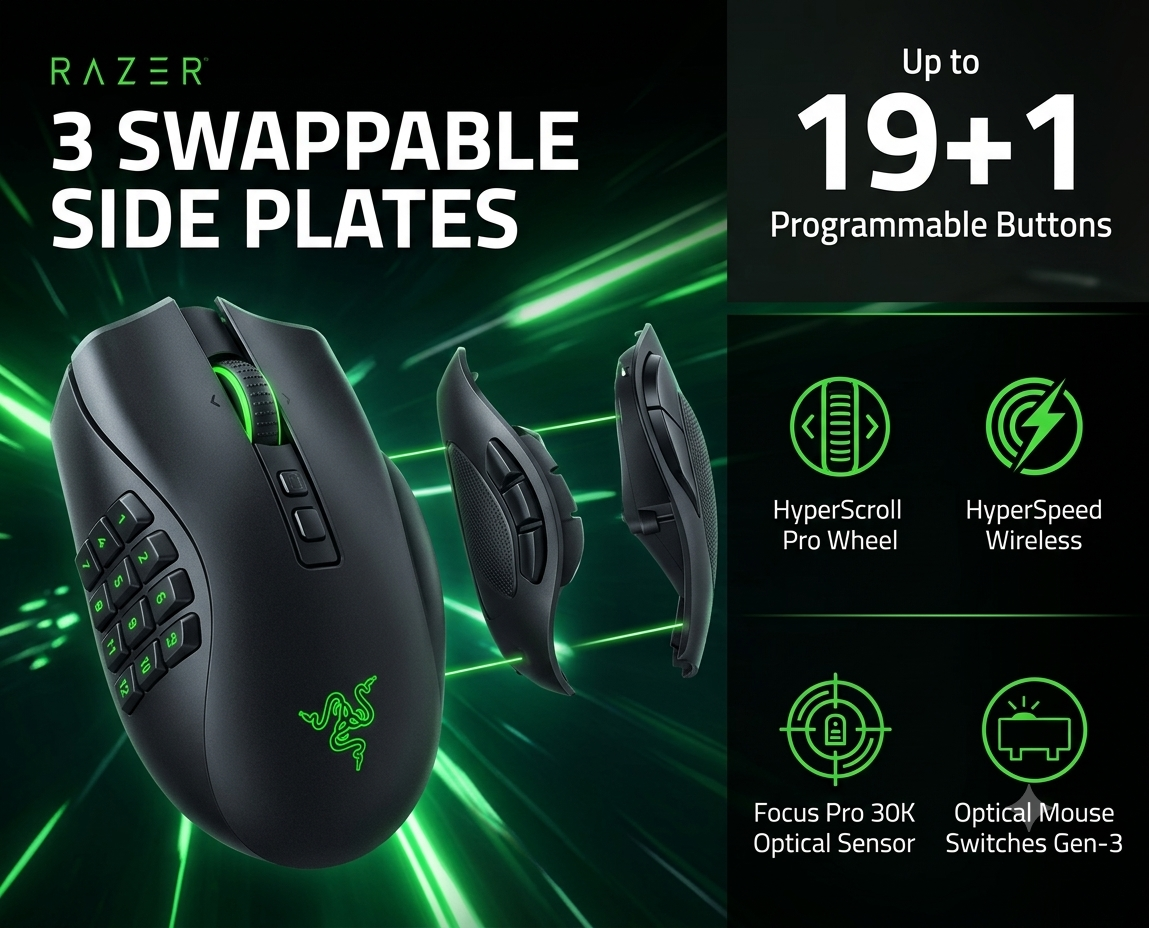
The thumb grid solves a real MMO problem
World of Warcraft can place dozens of useful actions within reach: primary rotation abilities, interrupts, defensives, movement tools, mounts, consumables, targeting commands, raid markers, and class utility. The 12-button side plate gives the thumb direct access to an entire block of commands without forcing the keyboard hand to stretch across awkward combinations.
The biggest benefit is not raw button count. It is reducing the distance between intention and input. Frequently used abilities can sit under the thumb, while keyboard modifiers such as Shift, Control, or Alt can multiply the number of practical bindings even further.
Best use: keep your core movement and modifiers on the keyboard, then place rotation, interrupt, defensive, and utility actions on the side grid.
Twelve buttons are only useful after muscle memory develops
The side grid feels crowded at first. Buttons become far more useful once they are grouped by purpose rather than assigned randomly. A clean layout might reserve the upper row for frequent rotation abilities, the middle row for defensives and interrupts, and the lower row for utility or movement.
During the first several sessions, it is normal to press the wrong button. After the layout becomes familiar, the advantage is substantial because the player stops hunting for keys and begins acting automatically.
It does not have to stay an MMO mouse
| Side plate | Best use | Practical benefit |
|---|---|---|
| 12-button | World of Warcraft, MMO rotations, macros, raid utility | Maximum thumb access and the strongest reason to buy the mouse |
| 6-button | Diablo, Heroes of the Storm, multi-genre PC play | Meaningful extra controls without turning the thumb rest into a keypad |
| 2-button | Overwatch, Hearthstone, everyday browsing | Cleaner grip for games that do not need a large button grid |
The swappable plate system is what makes the premium easier to justify. The mouse can remain useful outside World of Warcraft instead of becoming specialized hardware that sits unused whenever the game changes.
Comfortable for long sessions, but not lightweight
The Naga V2 Pro is shaped for palm-heavy control rather than ultralight flick aiming. That suits long raid nights and menu-heavy play, but players accustomed to very light competitive mice will notice the additional mass.
For World of Warcraft, the weight is less damaging than it would be in a twitch shooter because the mouse is often used for controlled camera movement, targeting, and ability access rather than constant high-speed swipes. Still, hand size and grip preference matter.
Reliable enough for long MMO sessions
Wireless performance remained stable during testing, and battery endurance was long enough that charging did not become a daily concern. The mouse supports multiple connection methods, making it easier to use across gaming and general PC work.
The more important point for WoW is consistency: a wireless MMO mouse only works if it feels dependable during raids, dungeons, and long play sessions. In testing, the connection did not become a recurring distraction.
Great for some WoW players—and unnecessary for others
Buy it if
- You use many abilities and macros
- You raid, run Mythic+, or play several characters
- You want modifiers plus a thumb grid
- You also play Diablo or other PC genres
- You value wireless convenience
Skip it if
- Your rotation uses only a few keys
- You dislike heavy mice
- You rarely use side buttons
- You prefer a very small or claw-grip mouse
- You want the cheapest workable MMO option
A simple way to organize the 12-button plate
| Buttons | Suggested category | Example use |
|---|---|---|
| 1–3 | Primary actions | Main rotation or frequently pressed abilities |
| 4–6 | Reaction tools | Interrupt, stun, dispel, movement ability |
| 7–9 | Defensives | Personal cooldowns, healthstone, emergency utility |
| 10–12 | Low-frequency utility | Mount, marker, profession, menu, or macro |
This is only a starting point. The best layout is the one that groups similar decisions together and remains consistent across characters.
Yes—if World of Warcraft is one of your main games
The Razer Naga V2 Pro earns its place for World of Warcraft because its core feature directly matches the game’s control demands. The 12-button grid can reduce keyboard strain, speed up reactions, and make complex layouts easier to manage once muscle memory develops.
The six- and two-button plates prevent the mouse from being trapped inside one genre, which is important at this price. Players who use only a small number of abilities will not receive the same value, but serious MMO players can justify the premium.
Bottom line: buy it for WoW when you want a complete control system—not merely a mouse with extra buttons.