What we tested
This review is based on more than 80 hours of use across World of Warcraft, Diablo, Overwatch, Hearthstone, and Heroes of the Storm. That mix matters because it tests the Naga V2 Pro beyond the obvious MMO use case.
World of Warcraft and Diablo put the side-button concept under the most pressure. Those are the games where quick access to abilities, menus, targeting commands, and repeated actions can justify a mouse with this many inputs. Overwatch tests whether the mouse can still feel responsive when speed and aim matter more than a giant bank of shortcuts. Hearthstone and Heroes of the Storm provide a middle ground: fewer frantic keybinds, but enough repeated commands and interface movement to expose whether the mouse feels comfortable over long sessions.
The central advantage
The Naga V2 Pro does not force every game into the same button layout. The magnetic plates allow the physical controls to change along with the software profile.
A substantial mouse with a purpose
The Naga V2 Pro has a broad, right-handed ergonomic shape designed to support the hand rather than disappear beneath it. That makes sense for long MMO sessions, where stability and easy thumb access matter more than shaving every possible gram.
The tradeoff is straightforward: this is not an ultralight competitive-FPS mouse. Players who use fingertip grip, have smaller hands, or strongly prefer very light hardware may find it bulky. For palm and relaxed claw users who like a planted feel, the shape is much easier to understand.
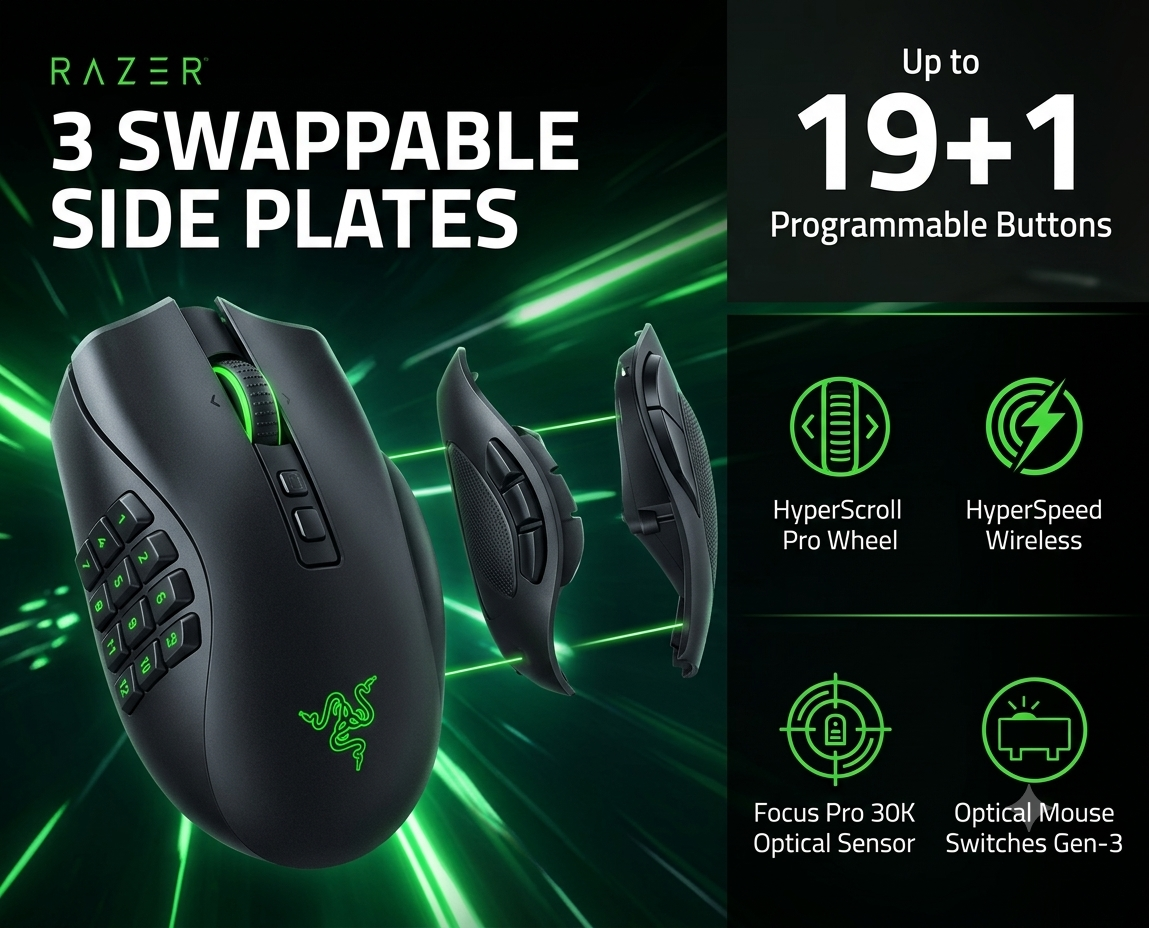
Its three side plates attach magnetically and give you a 12-button MMO layout, a six-button multi-genre layout, and a two-button layout. That physical modularity is the feature that separates it from a standard high-button-count mouse.
More buttons without one permanent compromise
The 12-button plate is the headline feature and the obvious choice for World of Warcraft or other games with crowded action bars. It can move frequently used abilities away from the keyboard and onto the thumb, but there is a learning curve. Twelve small buttons are only useful after muscle memory develops.
The six-button plate is the most balanced option for players who rotate among genres. It provides meaningful extra controls without turning the entire thumb rest into a keypad. The two-button plate is the cleanest setup for games where a large side grid would simply get in the way.
Razer describes the mouse as supporting up to 19+1 programmable buttons in its common control configuration, while current product materials also describe up to 22 programmable controls when all assignable inputs are counted. The practical takeaway is simpler: it offers far more remappable inputs than an ordinary gaming mouse. citeturn523233search0turn523233search1
Fast enough for more than MMOs
The Focus Pro 30K optical sensor and HyperSpeed Wireless connection place the internal hardware firmly in premium territory. In real play, the more important point is that the mouse does not feel limited to slow, menu-heavy games. It remains responsive enough for Overwatch, even though its weight and shape are not designed around the ultralight FPS trend.
The HyperScroll Pro wheel is unusually configurable. Razer allows adjustment of scroll-wheel behavior, including resistance and step feel, which can be useful when moving between deliberate weapon or ability selection and faster page or inventory scrolling. Razer also equips the mouse with third-generation optical switches. citeturn523233search1turn523233search14
Flexible connection options
The Naga V2 Pro supports HyperSpeed Wireless, Bluetooth, and wired USB-C use. Razer advertises up to 150 hours through HyperSpeed Wireless and up to 300 hours through Bluetooth. Actual battery life will vary with lighting, polling behavior, connection mode, and use, so those figures should be treated as manufacturer maximums rather than guaranteed results. citeturn523233search0turn523233search14
Optional wireless charging is available through compatible Razer accessories, but the charging puck and dock are separate purchases. That adds convenience, though it also pushes the total cost higher.
Powerful customization, with setup required
Razer Synapse is where the mouse becomes truly useful. Buttons can be remapped, macros assigned, profiles configured, sensitivity adjusted, and scroll-wheel behavior customized. Razer’s current support guidance confirms that Naga V2 button remapping is handled through Synapse. citeturn523233search23
The downside is that a mouse this configurable asks more from its owner. Someone who never builds profiles or remaps controls will pay for capability they barely use. The Naga V2 Pro rewards players willing to spend time creating a layout that matches each game.
Pros and cons
Pros
- Three genuinely useful magnetic side plates
- Excellent control depth for World of Warcraft and Diablo
- Strong sensor and low-latency wireless hardware
- Customizable HyperScroll Pro wheel
- Long advertised battery life
- Can replace several genre-specific mice
Cons
- Premium price
- Heavy and broad compared with modern FPS mice
- 12-button plate takes time to learn
- Advanced features depend on software setup
- Wireless charging accessories cost extra
- Overkill for players who use only two side buttons
How it earned 92/100
Key specifications
| Side plates | 12-button, 6-button, and 2-button magnetic plates |
|---|---|
| Programmable controls | Up to 19+1 buttons in Razer’s primary feature description; up to 22 assignable controls in current product copy |
| Sensor | Razer Focus Pro 30K optical sensor |
| Scroll wheel | Razer HyperScroll Pro Wheel |
| Connections | HyperSpeed Wireless, Bluetooth, and wired USB-C |
| Battery claim | Up to 150 hours HyperSpeed Wireless; up to 300 hours Bluetooth |
| Switches | Razer Optical Mouse Switches Gen-3 |
| Approx. dimensions | 119.5 × 75.5 × 43.5 mm |
| Approx. weight | 134 g, excluding cable and dongle |
| Charging | USB-C; compatible optional wireless charging accessories sold separately |
Specifications are based on Razer’s official product, launch, and support materials. citeturn523233search0turn523233search1turn523233search14
Who should buy it?
Buy it if:
You regularly play World of Warcraft, Diablo, MOBAs, or other games that benefit from numerous shortcuts; you like building custom control profiles; or you want one premium mouse that can physically adapt to several genres.
Skip it if:
You mainly play competitive shooters and prioritize very low weight, you have no interest in software customization, or your normal mouse use rarely extends beyond two side buttons.
One of the best tools for a multi-game MMO player
After more than 80 hours across World of Warcraft, Diablo, Overwatch, Hearthstone, and Heroes of the Storm, the Razer Naga V2 Pro earns a recommendation. It is expensive and unapologetically substantial, but the swappable side plates are more than a gimmick: they solve the biggest weakness of traditional MMO mice by letting the hardware change when the game changes.
For players who will actually use its profiles, programmable controls, and modular plates, the Naga V2 Pro is not merely a mouse with too many buttons. It is a flexible control system—and our 92/100 Battle-Ready Editor’s Pick.