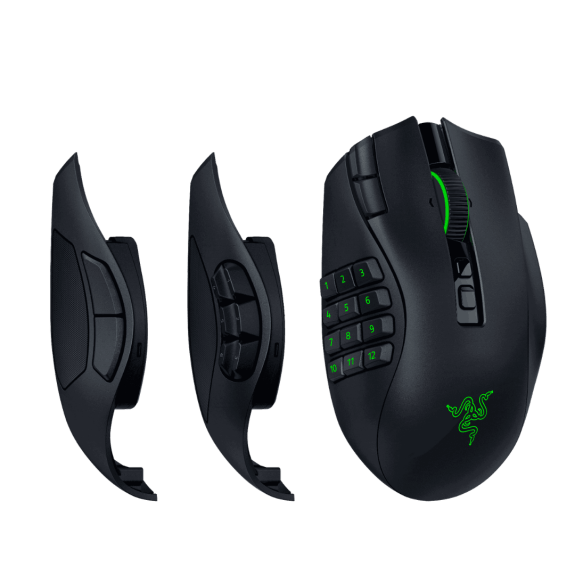
Button count should match your actual keybind load
World of Warcraft supports simple and extremely complex control schemes. A player using a compact rotation and a few utility keys may be perfectly comfortable with two side buttons. Another player may manage class abilities, defensives, interrupts, targeting macros, raid markers, mounts, consumables, and profession shortcuts from the mouse.
Buying twelve buttons because twelve sounds better often creates a crowded thumb area that never becomes useful. Buying too few can force awkward keyboard reaches and slow reactions.
Two buttons, six buttons, or twelve?
| Layout | Best for | Main tradeoff |
|---|---|---|
| 2 side buttons | Simple rotations, casual play, players who prefer keyboard binds | Limited space for utility, macros, and modifier layers |
| 6 side buttons | Balanced WoW setups, action RPGs, and multi-genre players | Not enough for a full action-bar replacement |
| 12-button grid | Raiders, Mythic+ players, healers, alt-heavy players, macro users | Learning curve and a busier thumb rest |
Useful rule: count the actions you repeatedly struggle to reach on the keyboard. That number matters more than the number printed on the mouse box.
One thumb grid can become several control layers
A twelve-button mouse does not need twelve unrelated commands. Using Shift, Control, or Alt as keyboard modifiers can turn the same physical buttons into organized layers.
For example, the base layer can hold rotation abilities, Shift can hold defensives, and Control can hold utility. This keeps related decisions in consistent positions across characters and reduces the need to memorize completely different layouts.
The system only works when the categories remain consistent. Random keybind placement creates confusion faster than it creates speed.
The best button grid is useless when the mouse hurts
MMO mice are often wider and heavier than lightweight competitive models. Palm-grip users may appreciate the support, while claw- or fingertip-grip players may find a large body tiring or difficult to reposition.
Hand size also changes how easily the rear rows of a twelve-button grid can be reached. A layout that looks perfect in a diagram can feel cramped or distant in actual play.
Palm grip usually favors
- Fuller body support
- Long raid comfort
- Stable thumb placement
- Controlled camera movement
Claw or fingertip may favor
- Lower weight
- Smaller body
- Fewer side buttons
- Faster repositioning
Heavy is not automatically bad for WoW—but it is still noticeable
World of Warcraft usually demands less rapid, repeated flick movement than a competitive shooter, so extra weight is often easier to tolerate. A heavier mouse can even feel stable during controlled camera movement and long menu-heavy sessions.
Still, weight accumulates across hours. Players who frequently lift the mouse, use low sensitivity, or alternate between WoW and shooters should take it seriously.
Reliability matters more than impressive battery claims
A wireless MMO mouse must remain dependable during raids, dungeons, and long sessions. Battery life is useful, but predictable warnings, convenient charging, and stable connectivity matter just as much.
In our Naga V3 Pro testing, the 2.4 GHz connection ran for 122 hours before we noticed response issues. A recharge restored normal performance. That long run matters more to us than a laboratory-style battery claim because it reflects how the mouse behaved through actual use.
Profiles and remapping decide whether the buttons stay useful
Good MMO-mouse software should make it easy to remap buttons, save game-specific profiles, adjust sensitivity, and preserve settings. Powerful hardware becomes frustrating when the software is confusing, unreliable, or dependent on constant background services.
Look beyond the button count and ask whether profiles can be changed quickly and whether the setup will remain consistent after updates or moving between games.
A dedicated MMO mouse can become expensive drawer furniture
Many players do not play only World of Warcraft. A twelve-button grid may be excellent in WoW but excessive in Overwatch, Hearthstone, browsing, or everyday PC work.
The Naga V3 Pro is our current favorite expression of that idea because the 2-, 6-, and 12-button plates remain easy to swap while the lower weight is friendlier over long MMO sessions. The G502 X Plus is the better fit when you want fewer thumb commands and spend more time outside MMOs.
Three Mice, Three Different Reasons to Buy
We have now logged more than 265 combined hours across the Naga V3 Pro, Naga V2 Pro, and Logitech G502 X Plus. They do not win for the same reason.
Razer Naga V3 Pro
130+ hours tested. We mostly run the 6-button plate. The reduced weight versus the V2 is noticeably less fatiguing in long MMO sessions, plate swapping is easy, and the lockable ring-finger button helps prevent accidental presses when play gets intense.
Our 2.4 GHz run reached 122 hours before response issues appeared; after recharging, performance returned to normal.
Check V3 Price on Amazon Read the 130+ Hour ReviewRazer Naga V2 Pro
80+ hours tested. Still an excellent WoW mouse with swappable 2-, 6-, and 12-button plates. It is heavier than the V3, but the deep MMO control and proven flexibility remain strong if the older model is meaningfully cheaper.
Check V2 Price on Amazon Read the V2 ReviewLogitech G502 X Plus
55+ hours tested. The 106 g body felt balanced and comfortable, and its 13 programmable controls are useful without turning the thumb area into a full MMO grid. We prefer it for Overwatch and general comfort; we prefer the Naga for WoW.
Check G502 X Plus on Amazon Check at Newegg Read the G502 Review| Mouse | Best WoW fit | What stood out in testing |
|---|---|---|
| Naga V3 Pro | Best overall / long MMO sessions | 130+ hours, easy plate swaps, lighter long-session feel, 6-button daily preference |
| Naga V2 Pro | Deep MMO control / older-model value | 80+ hours, proven 2/6/12 plate versatility, heavier chassis |
| G502 X Plus | Mixed genres and fewer thumb commands | 55+ hours, balanced 106 g feel, 13 controls, preferred for Overwatch |
What to decide before buying
| Question | Why it matters |
|---|---|
| How many actions need easier access? | Determines whether two, six, or twelve side buttons make sense. |
| Which grip do you use? | Determines whether a wide MMO body will remain comfortable. |
| Do you use modifiers? | Can multiply a smaller set of buttons into several organized layers. |
| Do you play other genres? | Determines whether a fixed twelve-button grid becomes restrictive. |
| Will you configure profiles? | Extra controls provide little value when they remain on default settings. |
Bottom line: the best MMO mouse is the smallest, most comfortable control system that gives you enough reachable commands for your real WoW setup.